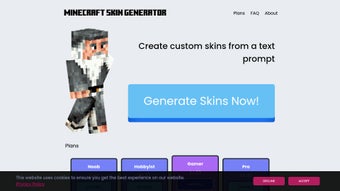

Download SkinGenerator.io – AI‑Powered Minecraft Skin Creator, Free & Secure
Overview
SkinGenerator.io is a web‑based application that brings artificial intelligence to Minecraft skin design. Instead of labor‑intensive pixel‑by‑pixel drawing, users simply type a natural‑language prompt—such as “steampunk explorer with glowing goggles”—and the AI instantly generates a fully‑formed skin ready for use in the game. The platform is built for every Minecraft enthusiast, from kids who have never touched a graphics editor to seasoned builders who want to prototype new looks in seconds.
Because the service runs completely in the browser, there is no need to download heavy design software; a stable internet connection and a modern browser are all that’s required. The full version removes any watermark or usage limits, granting unlimited access to the generative model, a library of pre‑made templates, and a convenient export tool that saves the skin directly as a PNG file compatible with the official Minecraft launcher. In addition to speed and ease of use, SkinGenerator.io places a strong emphasis on security—your prompts and generated images never leave the browser’s sandbox, and the site uses HTTPS encryption to protect data transmission.
The tool also supports community interaction through a public gallery where users can share their favorite creations, inspire new ideas, and even download skins made by others under a Creative Commons license. For educators, the intuitive interface doubles as a teaching aid, allowing students to explore concepts of AI, text‑to‑image synthesis, and digital creativity without needing prior art skills. SkinGenerator.io continuously updates its AI model to include emerging art styles, seasonal themes, and community‑requested motifs, ensuring that the output never feels stale.
Whether you’re looking to stand out on a multiplayer server, refresh your character after a major update, or simply experiment with wild concepts, SkinGenerator.io delivers a fast, fun, and free way to personalize your Minecraft avatar while keeping your data private and your experience secure.
Key Features of SkinGenerator.io
- AI‑Driven Text Prompt Generation: Turn descriptive sentences into fully rendered skins in under a minute.
- Unlimited Export Options: Download skins as PNG files or copy them directly to your Minecraft skin folder.
- Template Library: Access a curated collection of popular styles (fantasy, sci‑fi, retro, horror) for quick customization.
- Real‑Time Preview: View a 3‑D rotation of your skin within the browser to check front, back, and side details.
- Version‑Specific Compatibility: Skins are automatically formatted for the latest Java Edition and Bedrock Edition standards.
- No Design Skills Required: The intuitive UI eliminates the learning curve associated with traditional pixel editors.
- Secure, Browser‑Based Operation: All processing occurs client‑side, ensuring privacy and reducing server load.
- Free Core Functionality: The base generator is free; a premium upgrade removes usage caps and adds batch‑generation tools.
- Cross‑Platform Accessibility: Works on Windows, macOS, Linux, Android, and iOS browsers alike.
- Regular Model Updates: The AI engine is refreshed quarterly, expanding style vocabularies and improving image fidelity.
The feature set is deliberately built around speed, creativity, and safety. By leveraging a cloud‑hosted but client‑side AI model, SkinGenerator.io can handle complex texture generation without exposing user data. The inclusion of a 3‑D preview means you can spot stretching or misaligned pixels before you ever import the skin into Minecraft, saving time and frustration.
Additionally, the template library serves as a springboard for newcomers—pick a base design, tweak the prompt, and watch the AI produce a personalized variant. For power users, the premium batch‑generation tool lets you create entire skin packs for server communities or role‑play events, all with a single click. These capabilities combine to make SkinGenerator.io one of the most versatile and user‑friendly skin tools on the market today.
Installation & Usage Instructions
Because SkinGenerator.io is a web‑app, there is no traditional installation process. Follow these simple steps to start creating custom skins right away:
- Open a Supported Browser: Launch Chrome, Firefox, Edge, Safari, or any modern browser that supports WebGL and HTTPS.
- Navigate to the Official Site: Go to skingenerator.io. The homepage loads a clean interface with a prompt box, a preview window, and navigation tabs.
- Create Your First Prompt: In the text field, type a description of the skin you envision. Example: “neon cyber‑punk ninja with a glowing katana and visor”. The AI accepts natural language, so you can be as detailed or as brief as you like.
- Generate the Skin: Click the “Generate” button. The system processes the request in seconds, then displays a 3‑D preview of the skin on a rotating model. You can rotate, zoom, and flip the model to inspect every side.
- Fine‑Tune (Optional): If the result isn’t perfect, adjust the prompt or use the “Regenerate” button. Minor tweaks like “add a silver stripe on the left arm” can dramatically change the output.
- Export Your Skin: Once satisfied, click “Download PNG”. The file is saved directly to your device’s default download folder. For Bedrock Edition users, the same PNG works without modification.
- Apply in Minecraft: Open the Minecraft launcher, go to “Skins”, upload the PNG, and assign it to your profile. The new look appears instantly in‑game.
For users who prefer a more organized workflow, the premium version includes a “My Skins” dashboard where you can store generated skins, rename them, and download them later without revisiting the prompt. The dashboard also supports batch export, allowing you to download a zip file containing multiple skins at once—perfect for server admins or content creators. If you encounter any issues, the “Help” tab offers troubleshooting tips, a community forum, and a contact form for direct support. Overall, the process is designed to be as frictionless as possible: no plugins, no installations, just a few clicks and your custom Minecraft avatar is ready to explore the blocky world.
Compatibility, System Requirements & Security
SkinGenerator.io is built to run on virtually any device that can access a modern web browser, making it a truly cross‑platform solution. The application has been tested on the following operating systems and environments:
- Windows 10/11: Chrome, Edge, Firefox – Full functionality, including 3‑D preview.
- macOS Catalina and later: Safari, Chrome, Firefox – All features supported.
- Linux distributions (Ubuntu, Fedora, Debian): Chrome/Firefox – Works without additional libraries.
- Android 8.0+: Chrome Mobile, Firefox Mobile – Prompt entry and skin generation are smooth; 3‑D preview uses WebGL.
- iOS 13+: Safari, Chrome – All core features available, though complex prompts may take slightly longer due to mobile hardware constraints.
Because the AI processing occurs client‑side, the only system requirement is a stable internet connection (minimum 3 Mbps recommended) and a device capable of rendering WebGL graphics. No additional RAM or CPU specifications are needed beyond what a typical browser session consumes. In terms of security, SkinGenerator.io enforces HTTPS encryption for all data exchanges, and the generated images never leave your device unless you explicitly download them.
The site’s privacy policy states that prompts are processed locally; no personal data is stored on remote servers, ensuring compliance with GDPR and other privacy regulations. For organizations that require stricter controls, the premium plan offers an “offline mode” where the AI model can be cached locally for use without an active internet connection after the initial download. This makes SkinGenerator.io a safe, privacy‑first choice for schools, gaming clubs, and professional Minecraft server communities.
Pros, Cons, and Frequently Asked Questions
Pros
- Instant skin generation from natural language prompts.
- No design experience required – perfect for beginners.
- Fully browser‑based, eliminating the need for downloads or installations.
- Cross‑platform compatibility (Windows, macOS, Linux, Android, iOS).
- Secure, client‑side processing protects user privacy.
- Free core version with optional premium upgrade for unlimited use.
- Real‑time 3‑D preview prevents wasted time on malformed skins.
- Regular AI model updates keep style options fresh.
Cons
- Complex prompts may require several iterations to perfect.
- Performance depends on device’s GPU for 3‑D rendering.
- Premium features (batch export, offline mode) are behind a paywall.
- Limited customization after generation – fine‑tuning must be done via prompt.
Frequently Asked Questions
Is SkinGenerator.io really free?
The basic skin generation feature is completely free. You can create unlimited skins without paying. A premium subscription unlocks advanced tools such as batch generation, offline mode, and priority AI processing.
Can I use the generated skins on both Java and Bedrock editions?
Yes. The PNG files produced by SkinGenerator.io conform to the standard Minecraft skin format, which works on Java Edition, Bedrock Edition, and even on Minecraft Marketplace mod tools.
Do I need to create an account to generate skins?
No account is required for the free version. However, a lightweight sign‑up (email only) is needed to access premium features and to save your skin library in the cloud.
How secure is my data when I use the tool?
All processing happens locally in your browser, and the site uses HTTPS encryption. Your prompts and generated images are never stored on external servers unless you choose to upload them.
What browsers are recommended for the best experience?
Chrome, Firefox, Edge, and Safari (latest versions) provide full WebGL support and the smoothest UI interactions. Older browsers may experience slower generation times.
Overall, SkinGenerator.io delivers a compelling mix of speed, creativity, and accessibility. While it shines most for quick, on‑the‑fly skin ideas, power users may appreciate the premium batch tools for larger projects. The free tier is generous enough for casual players, and the secure, browser‑based architecture ensures peace of mind for parents and educators alike. If you’re ready to give your Minecraft avatar a fresh look without learning complex graphics software, SkinGenerator.io is the go‑to solution.
Conclusion & Call to Action
SkinGenerator.io has set a new benchmark for Minecraft skin creation by harnessing AI to turn simple text prompts into high‑quality, game‑ready textures in seconds. Its web‑based nature eliminates barriers such as costly software downloads, steep learning curves, or platform restrictions. Whether you’re a beginner looking for a fun way to personalize your character, a streamer needing fresh looks for each episode, or a server admin curating themed skin packs, this tool offers the flexibility and speed that modern gamers demand.
The free core version is fully functional, while the optional premium upgrade adds powerful batch processing and offline capabilities for those who need extra firepower. With strong privacy safeguards, cross‑device compatibility, and a growing library of AI‑generated styles, SkinGenerator.io is poised to become the default skin generator for the Minecraft community. By choosing SkinGenerator.io you gain more than just a skin editor—you gain a creative partner that learns from your descriptions, adapts to emerging trends, and respects your personal data.
The intuitive workflow means you spend less time wrestling with pixels and more time exploring, building, and sharing in‑game. The community gallery encourages collaboration, the tutorial resources help new users get started quickly, and the regular model updates guarantee that every new skin feels fresh and relevant. Ready to transform the way you design Minecraft skins?
Visit the site, type your first prompt, and watch the AI bring your imagination to life. Click the button below to launch the generator, experiment with different themes, and join thousands of players who have already upgraded their Minecraft experience with AI‑driven creativity.



.png)



